Powerful Features for Modern Schools

Explore the tools that empower teachers, engage students, and simplify administration.

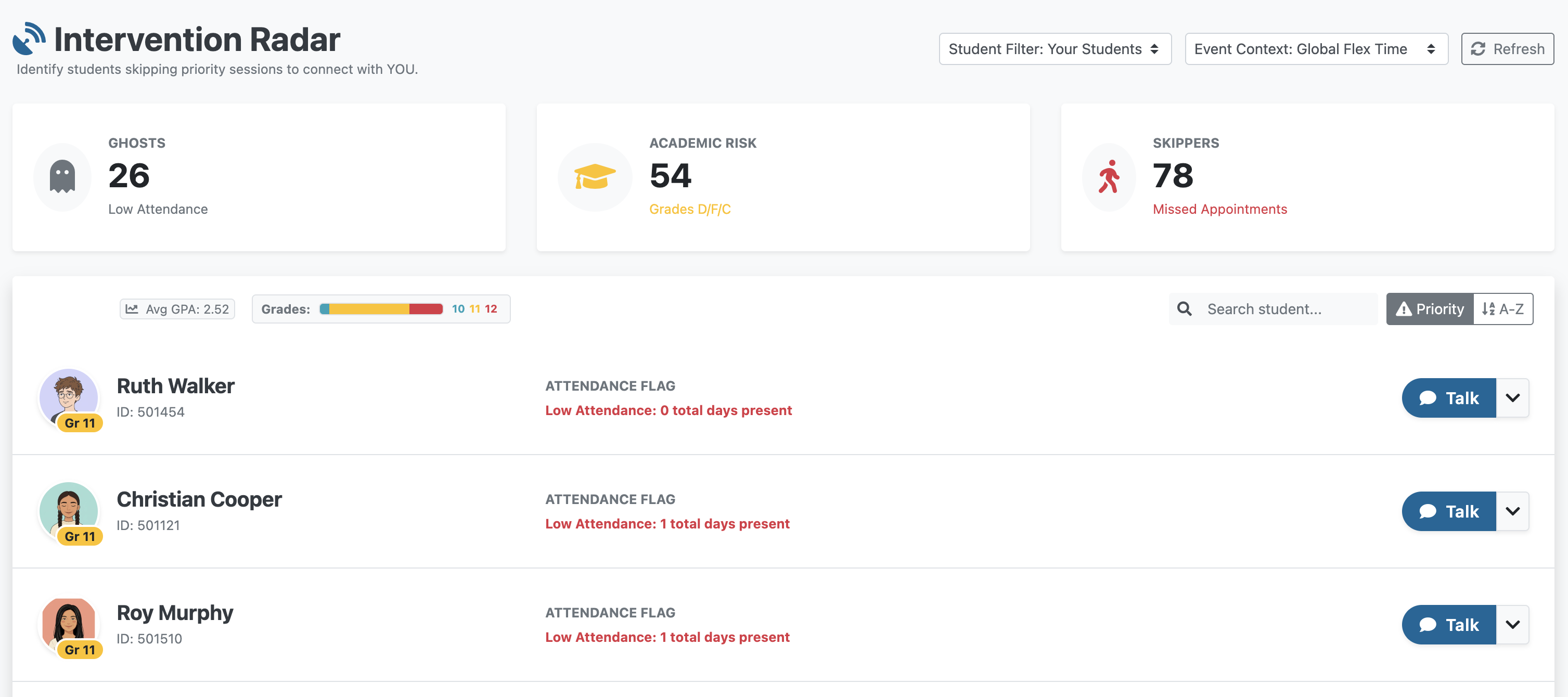
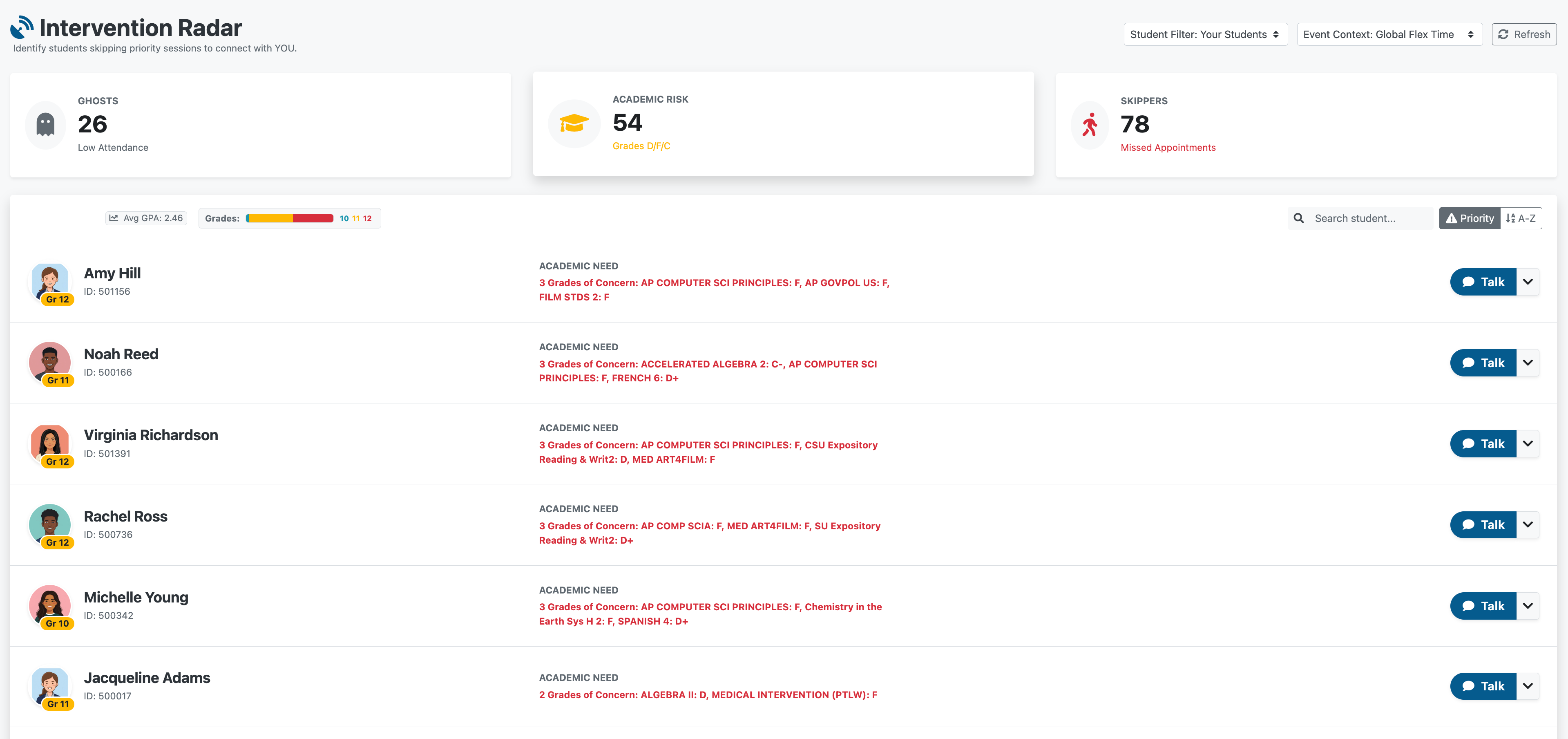
Intervention Radar Dashboard showing Ghosts, Academic Risk, and Skippers categories

Three at-risk categories, one powerful view
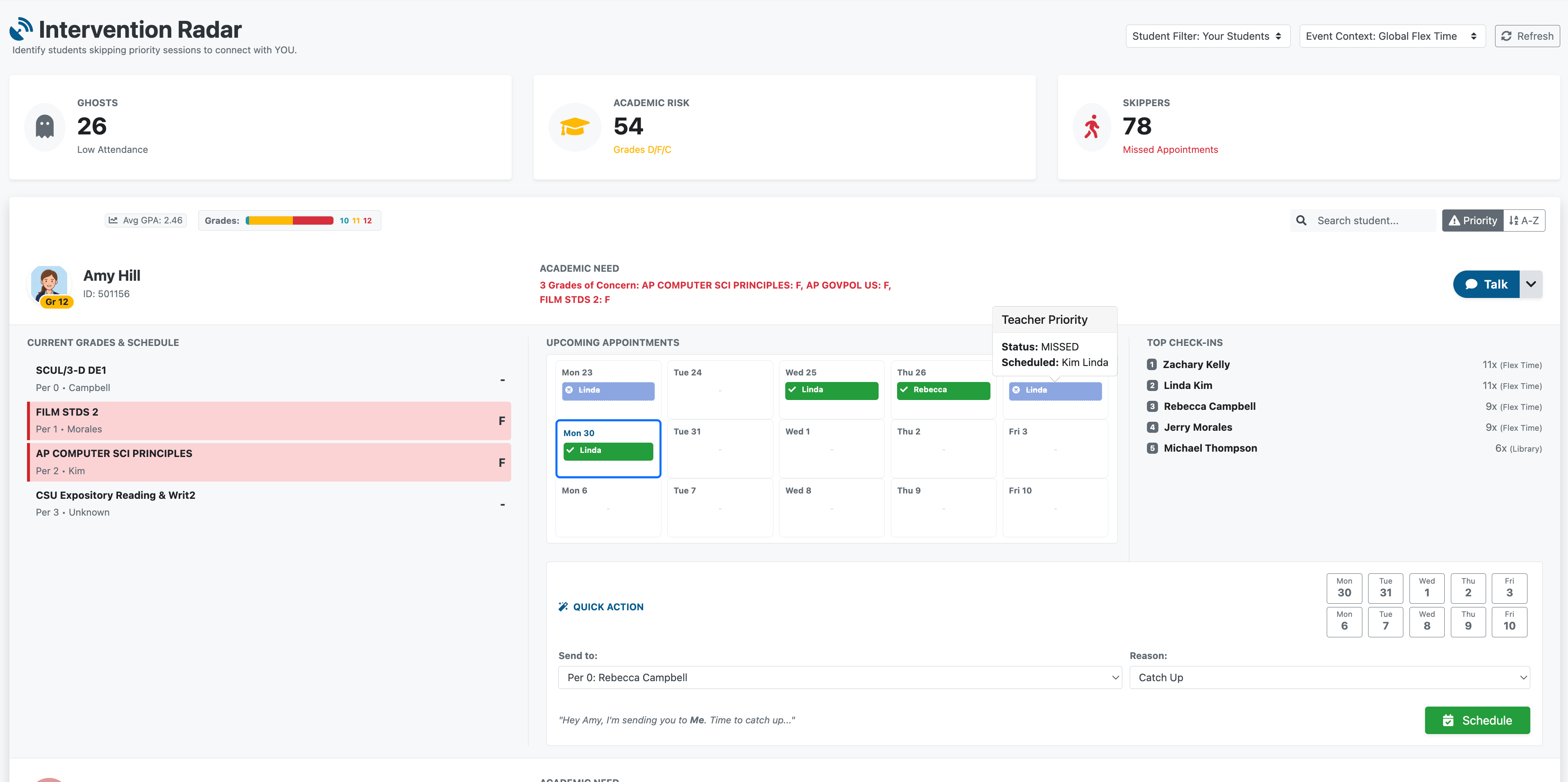
Intervention Radar expanded student view with grades, appointments, and quick action

Drill into any student — see grades, appointments, and act instantly
Academic Risk filter showing students with D/F/C grades

Filter by Academic Risk to surface the most urgent needs

EXCLUSIVE

Intervention Radar™

Instantly identify students who need help before they slip through the cracks.

Our Intervention Radar cross-references attendance patterns with grades to surface students who may need support — saving you hours of spreadsheet analysis. Algorithms inform; educators decide.

  • Academic Risk Monitoring: View current failing grades directly on your roster
  • Attendance Monitoring: Flag "skippers" and students avoiding check-ins
  • One-Click Intervention: Easily compel appointments for students in need
  • Smart Baseline: Automatically adjusts to actual school days — no false alarms during short weeks
Request a Demo
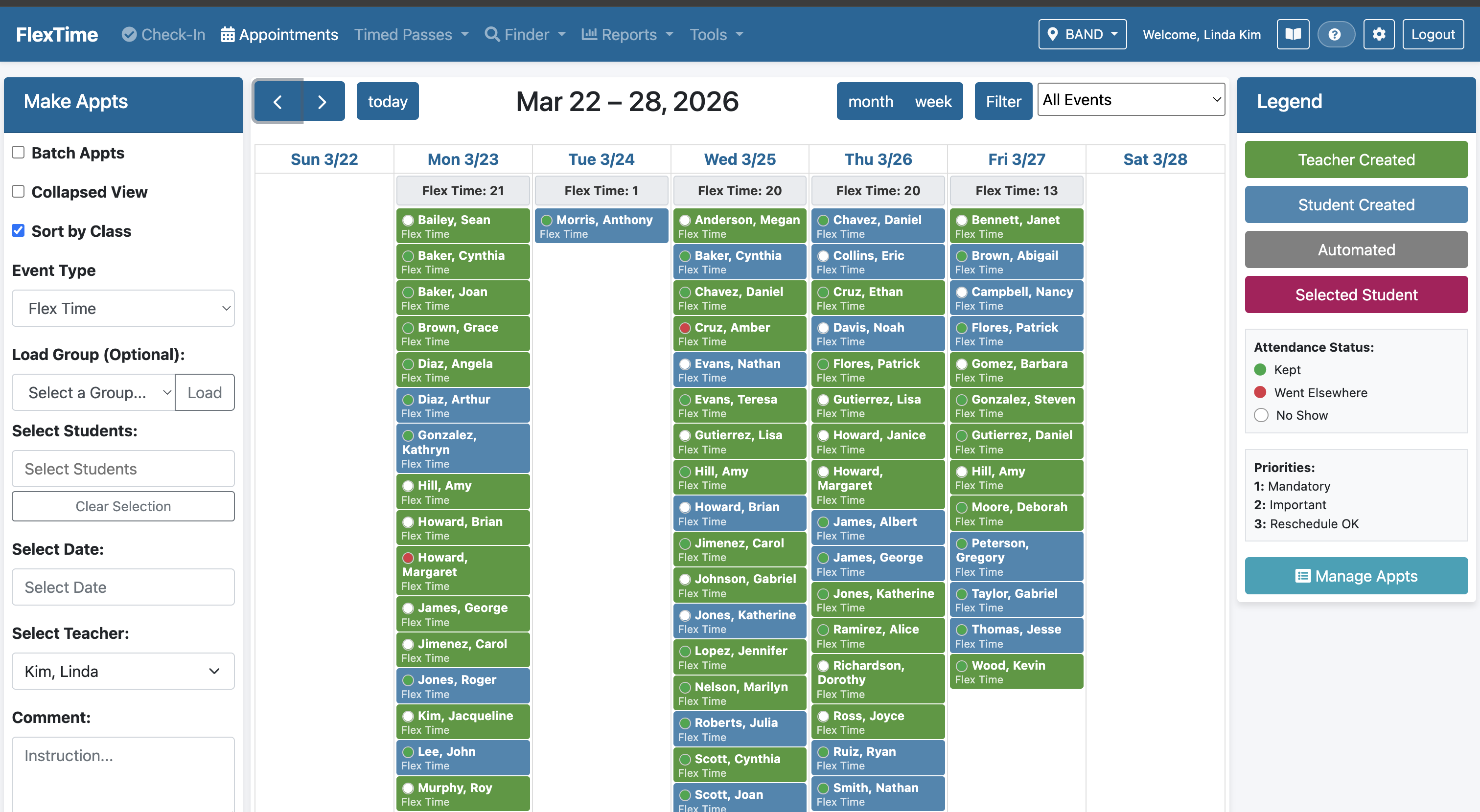
Appointment scheduling page with weekly calendar and student details

Student detail view with weekly schedule and quick actions

Flexible Scheduling System

Empower students to own their learning while maintaining accountability.

Whether it's for enrichment, remediation, or project work, TeachMore's scheduling engine handles the complexity of assigning thousands of students daily.

  • Self-Service Booking: Students browse and book their own appointments from any device
  • Priority Override: Teacher mandates supersede student choices for critical interventions
  • Capacity Management: Automatic caps prevent overcrowding in popular sessions
  • Conflict Detection: Instant warnings if double-booking a student
  • Admin Restrictions: Configurable group-level scheduling restrictions for campus safety and management
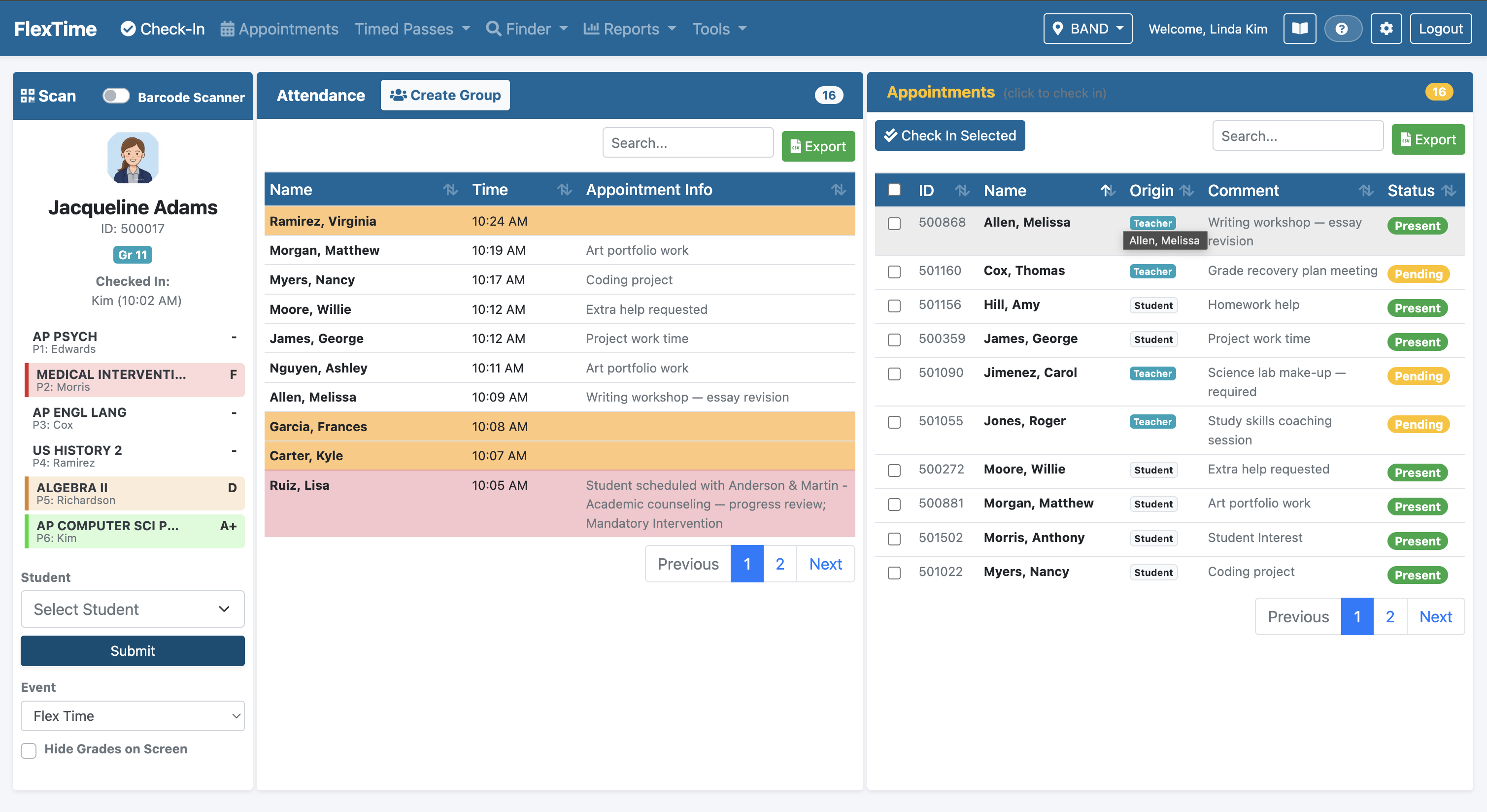
FlexTime scan and check-in page showing real-time student arrivals

Scan student barcodes or use the built-in camera for instant check-in

FLEXIBLE HARDWARE

Barcode Check-In & Security

Eliminate manual roll-call and secure your campus during unstructured time.

Using standard student ID barcodes, teachers can process an entire classroom in seconds. Maintain the flexibility to use traditional USB readers with laptops, or let teachers scan with their phone or tablet camera.

  • Flexible Options: Use traditional USB readers or any device with a built-in camera as a barcode scanner
  • Instant Validation: "Wrong Room" alerts prevent students from wandering
  • Flexible Attendance Flows: Seamlessly manage students moving between teachers, allowing check-ins with multiple teachers during a single flex period with clean check-out options
  • Desktop Option: Web dashboard supports USB barcode scanners on laptop and desktop computers
  • Barcode Generator: Built-in tool to create barcodes for students missing IDs
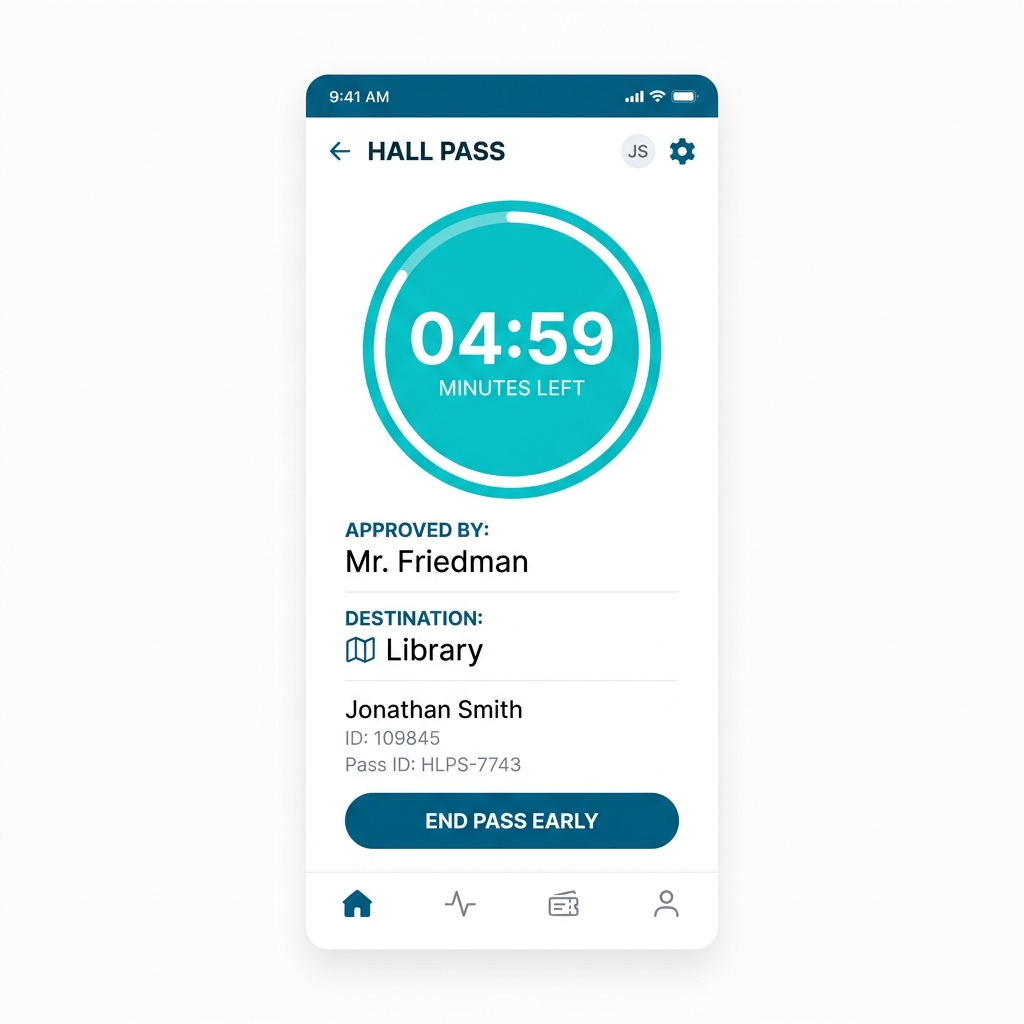
Digital hall pass with a live countdown timer

Digital hall pass with an active countdown timer on a student's phone

INCLUDED

Digital Hall Passes

Modernize campus movement with visibility and accountability — no extra subscription required.

Students issue timed passes for specific locations directly from their app. Built-in countdown timers help students return on time and allow staff to monitor overdue passes.

  • Countdown Timers: Built-in timers help students return on time
  • Active Pass Limits: Prevents students from creating multiple simultaneous passes
  • Teacher & Student Initiated: Both staff and students can create passes
  • Integrated History: Past history merges with attendance for complete movement visibility
  • Admin Restrictions: Group-level controls to manage who can be out at the same time

With TeachMore, digital hall passes are fully integrated and built-in under your flat rate.

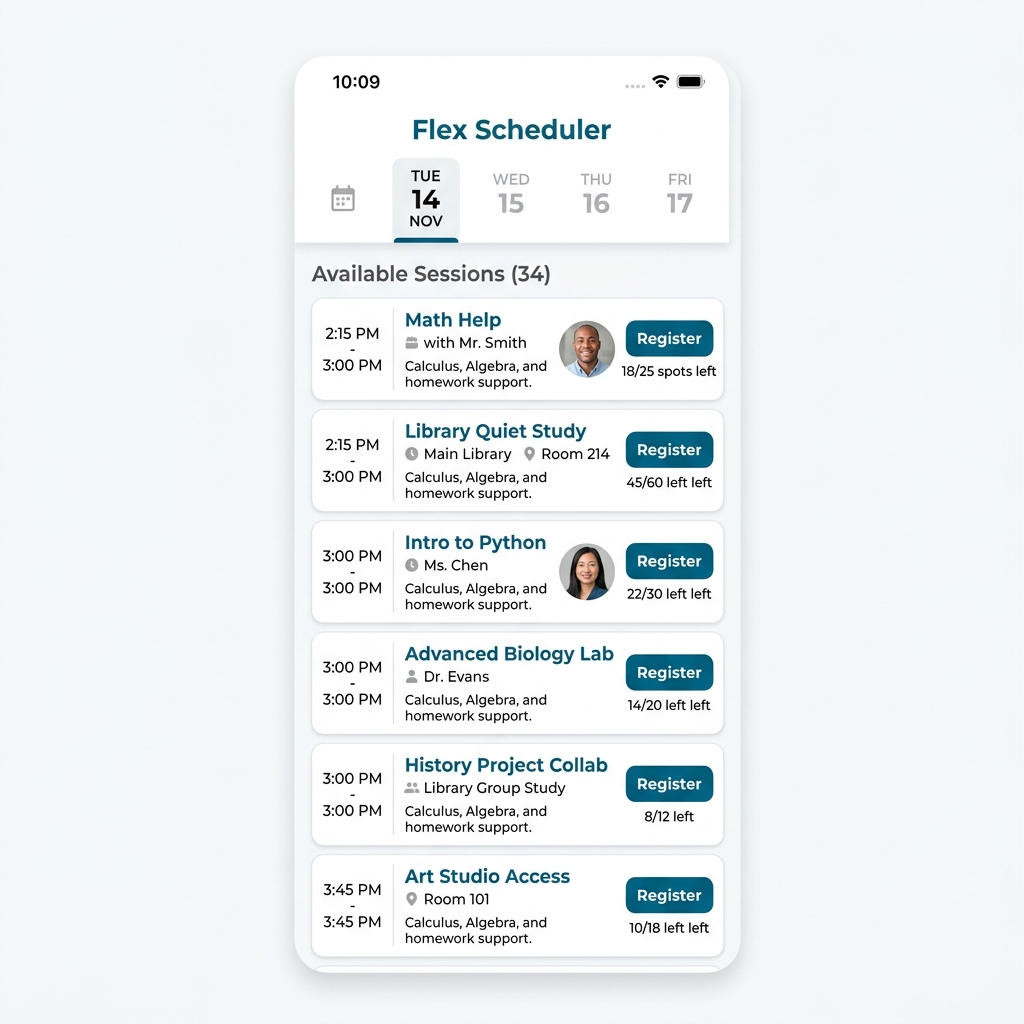
Student mobile app showing available flex time sessions

Students can browse and book flex sessions from any device

Student App

Your time. Your choice. One app.

Available on iPhone, iPad, and Android. Browse available flex sessions, book the ones that matter, and request hall passes — all from a lightweight app that's smaller than most photo filters. At ~25 MB, it won't fill up anyone's phone.

  • Self-Schedule: Students browse and book appointments independently
  • Locked Interventions: Teacher mandates can't be cancelled by students
  • Real-Time Feedback: Instantly see if a session is full, available, or conflicting
  • Works on Older Devices: iPhone 8 (2017)+, iPads, or any Android from the last 7+ years (Android 7.0+)
Intervention Radar Dashboard capturing at-risk students

Catch students falling through the cracks before it's too late

Automated Appointments (Safety Net)

Ensure 100% of students have a place to go — no manual effort required.

Our smart auto-scheduler finds students who haven't signed up for a session and intelligently assigns them using a multi-phase algorithm that prioritizes academic need.

  • Academic First: Prioritizes placing students with teachers where they have D or F grades
  • Roster Matching: Ensures students are placed with teachers they actually know
  • Load Balancing: Distributes students evenly to prevent overcrowding in any room
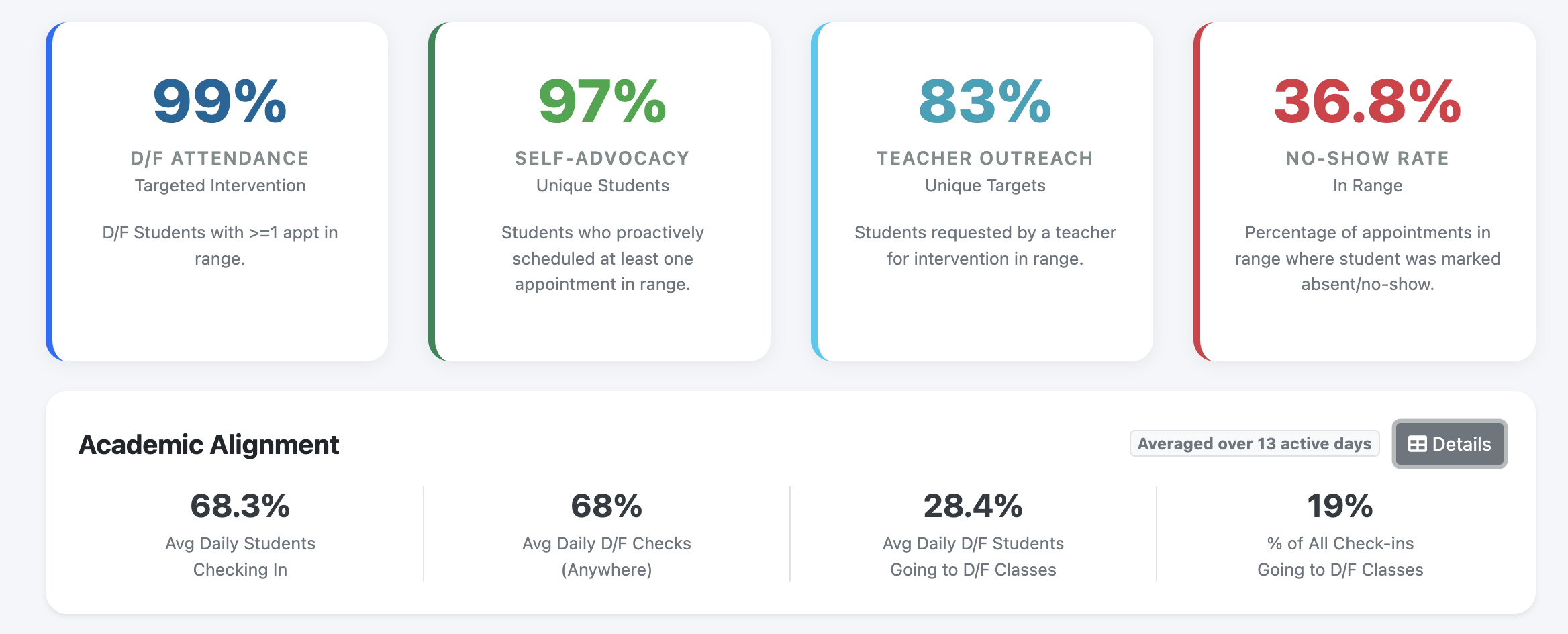
Engagement analytics showing D/F attendance, self-advocacy, and teacher outreach metrics

Engagement reports prove your program's impact

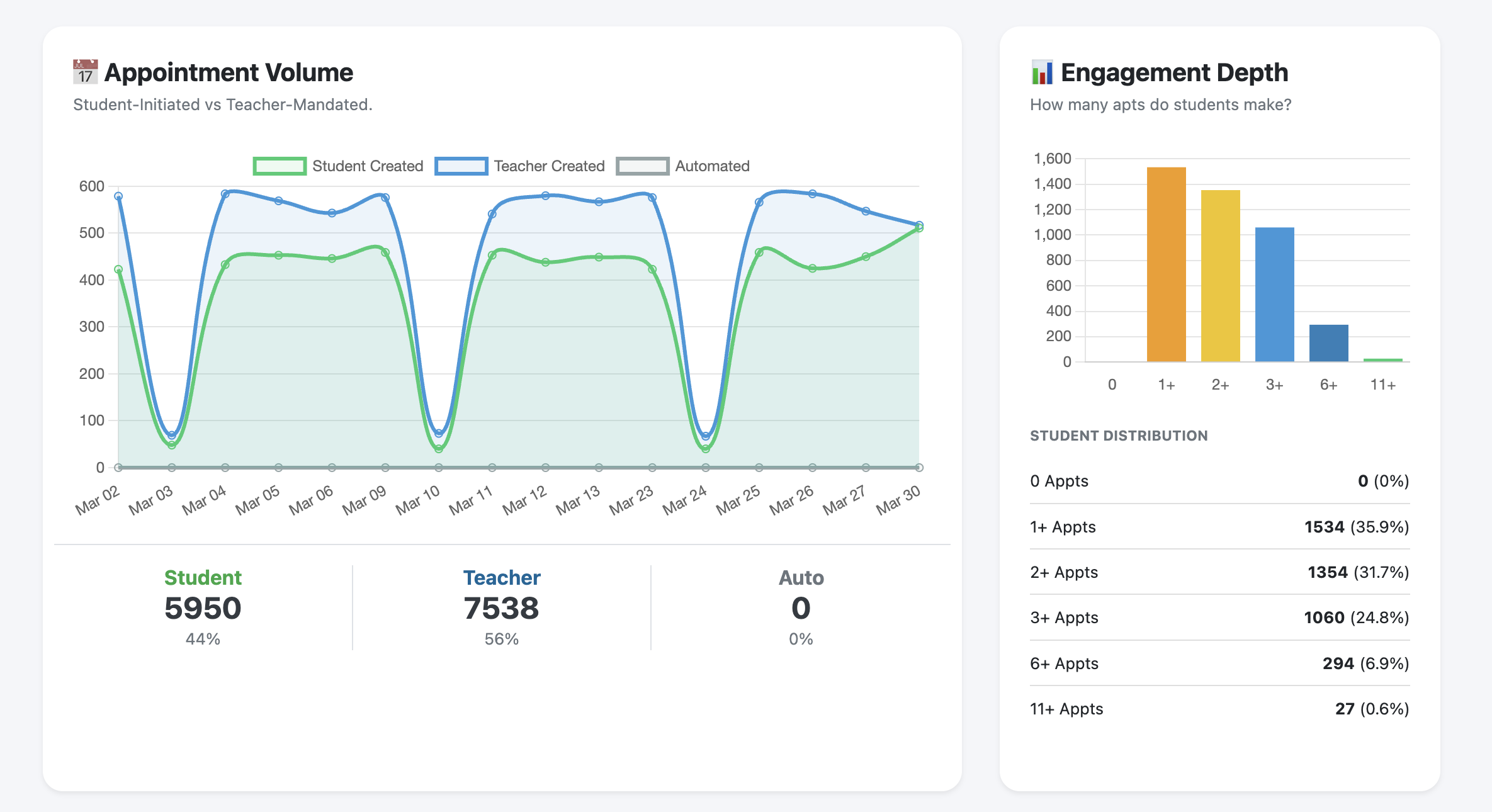
Appointment Volume chart with student vs teacher-created breakdown

Appointment volume trends with engagement depth distribution

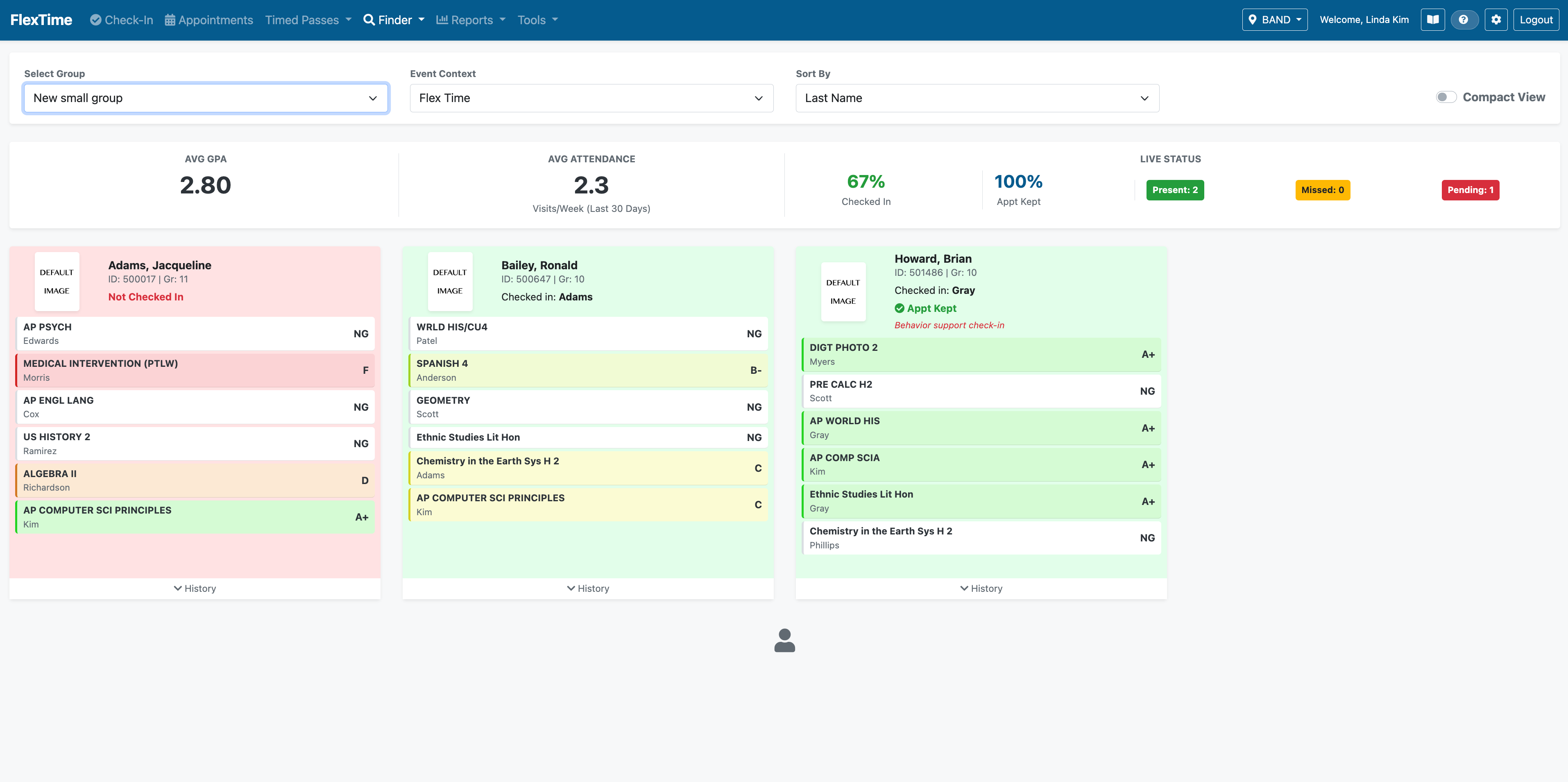
Group Finder showing student cards with grades, attendance, and live check-in status

Group Finder — monitor cohorts with live grades and check-in status

EXCLUSIVE

Data-Driven Insights

Know whether your intervention programs are reaching the students who need them most.

Go beyond attendance counts. Measure whether at-risk students are actually engaging with support sessions, track appointment trends, and build the case for your flex program with real data.

  • Safety Net Coverage: Are your D/F students actually showing up to mandated support sessions? See the gap at a glance
  • Grade Grid: Connect attendance and scheduling data directly to academic outcomes
  • Campus-Wide Safety Net: Ensure 100% of students are accounted for
  • Operational Metrics: Monitor pass usage, tardy trends, and frequent flyers

SIS Integration

Effortless roster sync through direct connections and district-approved platforms.

TeachMore already integrates with major student information systems via OneRoster. We're expanding with additional platforms so IT maintains full control over what data is shared.

  • Direct OneRoster: Active integrations with Infinite Campus, Aeries, and others
  • Clever: OAuth 2.0 rostering and single sign-on Coming Soon
  • ClassLink: OneRoster API via ClassLink Roster Server Coming Soon
  • SSO: Google OAuth for teacher and student login, with Clever/ClassLink SSO on the way

Ready to See These Features in Action?

Contact us for a demo and discover how TeachMore can transform your school's flex time.

Get in Touch